
A padded backpack can still leave your shoulders aching by the end of the day. A backpack with good back support depends on more than cushioning: fit, packing, and how the load moves with you all matter. If carrying a laptop, work essentials, and daily extras leaves you uncomfortable, it can be hard to know which design details to compare.
Start with a pack that suits your body and routine. Then position heavier items close to your back and adjust the straps so the pack feels stable. No single feature can make an overloaded or poorly fitted bag comfortable.
This guide explains what to look for in a supportive backpack, from strap and back panel design to useful organization for everyday essentials. You’ll also learn how to choose a pack for your typical load, adjust it comfortably, and pack it for easier movement through the day.
Key Takeaways
- Test a backpack with good back support using the items you typically carry, not just when it’s empty.
- Assess straps, back panel, pack shape, and organization together. No single detail guarantees comfort.
- Compare padding with adjustability and stability; extra cushioning alone doesn’t ensure a comfortable fit.
- Adjust the straps with your usual load in place, then notice whether the pack stays steady as you move.
- Choose for your routine, whether you carry a laptop to work or essentials on a day hike.
Why a Backpack With Good Back Support Starts With Fit
An empty backpack may feel comfortable in your hands, then sit differently once it holds a laptop, charger, water bottle, and other daily essentials. Added weight changes how the pack rests and moves. Judge fit with a realistic load rather than relying on padding or trying the bag on empty.
A supportive fit means the backpack rests steadily against your body and feels comfortable for your shape and load. The straps should hold it in position without digging in or slipping. The pack shouldn’t swing or noticeably pull you backward as you walk. Comfort is personal: body proportions, clothing, and how long you carry the bag all affect how it feels.
Support comes from a stable fit and well-placed load, not thick padding alone. A cushioned panel may feel pleasant at first, but it can’t correct a poorly positioned or overfilled pack.
What does back support mean in a backpack?
The back panel and shoulder straps help position the pack against your body. Together, they affect how it rests and whether it stays steady as you walk. The contents matter too: items that shift around can make a pack feel less balanced. Designs range from simple frameless styles to framed packs. This overview of different types of backpacks offers background on those distinctions.
Think of support as a system: fit, stability, and balanced contents working together. A backpack isn’t a treatment for persistent back pain. If discomfort continues or concerns you, seek guidance from a qualified health professional.
Who benefits from paying closer attention to backpack fit?
Commuters carrying a laptop, charger, and daily essentials may notice small fit issues over a long walk or transit journey. Travelers deal with changing loads from one part of a trip to another, while day hikers may carry different essentials for a longer stretch. In each case, how the pack feels under its usual load matters more than how it looks on a shelf.
There’s no universal fit. Body shape affects where straps rest, clothing can change how they feel, and routine determines how long and often you carry the bag. Use your typical contents when assessing comfort. Notice whether the pack stays close and steady as you move instead of relying on one feature to promise support.
Which Backpack Features Can Improve Carrying Comfort?
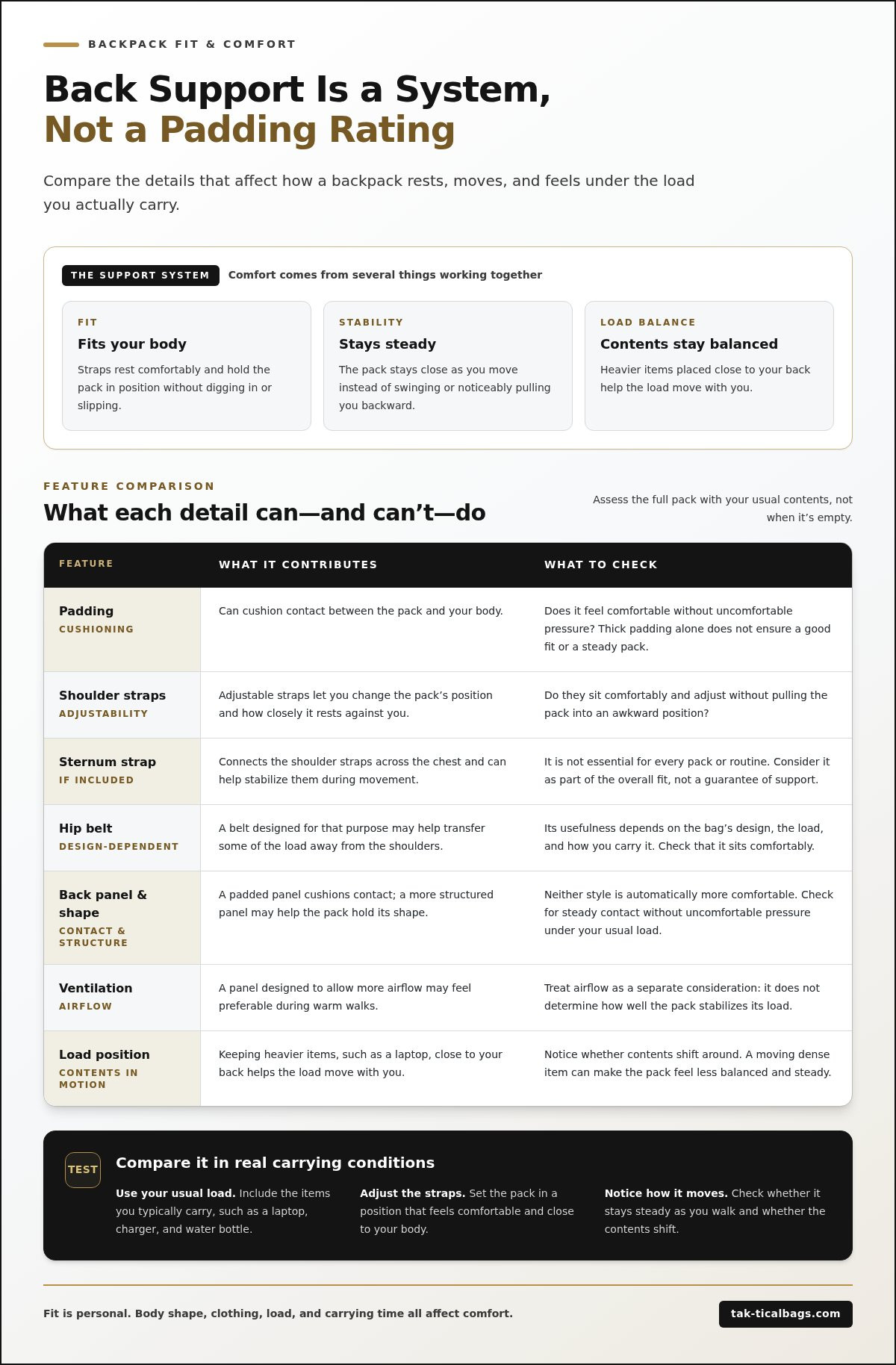
Carrying comfort depends on several details working together. Shoulder straps affect how the pack sits; the back panel and pack shape influence contact and stability; and the position of the contents changes how the load moves. A bag can have appealing features yet feel awkward if it swings away from your body or its contents shift as you walk.
Compare strap adjustability, panel shape, pack stability, ventilation, and how the load sits against your back. These are practical details to assess when comparing backpacks. Broad labels such as “ergonomic” don’t tell you how a particular pack will feel on your body. The American Academy of Orthopaedic Surgeons offers practical Backpack Safety guidance on features such as padded straps and wearing a pack correctly.
Shoulder straps, sternum straps, and hip belts
Adjustable shoulder straps let you change the pack’s position and how closely it rests against you. Check that they sit comfortably and adjust without pulling the pack into an awkward position. A sternum strap, when present, connects the shoulder straps across the chest and can help stabilize them during movement. It isn’t essential for every pack or routine.
A hip belt may help transfer some of the load from the shoulders when it’s designed for that purpose and sits comfortably. Its usefulness depends on the bag’s design, the load, and how you carry it. Treat each strap as part of the overall fit, not as a guarantee of support.
Back panels, lumbar contact, and ventilation
The lumbar area is the lower part of your back, where contact with a pack may be especially noticeable. A padded panel can cushion contact, while a more structured panel may help a pack hold its shape. Neither is automatically more comfortable. Check whether the panel rests steadily against you without uncomfortable pressure, including when the backpack contains your typical items.
Ventilation is a separate consideration. A panel designed to allow more airflow may feel preferable during warm walks, but airflow doesn’t determine how well a pack stabilizes its load. Padding thickness alone says little about fit, either. Watch for contents that shift: a laptop or other dense item moving around can make the pack feel less steady than when held close to your back.
Use these checks to compare backpacks for your own routine rather than relying on a feature label. For everyday carry options, explore Tak-tical’s backpacks.
Does More Padding Mean Better Back Support?
No. Thick cushioning can feel soft at first, but padding alone doesn’t show whether a backpack fits your body or stays in place under load. A highly padded pack may still sit too low, shift as you walk, or feel unbalanced. When choosing a backpack with good back support, consider how cushioning works alongside adjustability, stability, and the position of the contents.
There’s no universally best construction style. A softer panel may suit one person, while a more structured shape may feel steadier to someone else. Your routine matters too. Compare backpacks with the kind of load you actually carry and notice how they feel as you move.
How to compare padding with fit and stability
Use this quick comparison to look beyond appearance. Each factor contributes something different, and none guarantees comfort on its own.
| Factor | What to assess |
|---|---|
| Padding | Does it cushion contact without creating uncomfortable pressure? |
| Adjustability | Can you change the straps so the pack sits comfortably on your body? |
| Stability | Does the backpack stay positioned when you walk, rather than swaying or shifting? |
| Load placement | Do the contents sit securely, or move around inside the pack? |
Give strap adjustment and back panel shape as much attention as cushioning. Straps that don’t sit comfortably can leave a padded panel poorly positioned; a panel that suits your back may help the pack feel more settled. Assess the backpack while it’s loaded, then walk with it for a short time. Appearance alone can’t tell you how it will carry.
When a supportive-looking backpack may not feel supportive
Watch for straps that slip, pressure points, or a pack that hangs lower than feels comfortable. Uneven contents can make one side feel heavier, while loose items may shift with each step. These small movement cues can affect comfort, even if the backpack looks well cushioned.
Fit varies with body shape, clothing, and carrying task. A setup that feels comfortable on a short commute may feel different during a longer walk or with a fuller load. For more guidance on fit and wearing a backpack, review KidsHealth’s backpack safety tips. Let your own loaded, moving fit guide the comparison, not padding thickness or a broad comfort claim.
How to Fit and Pack a Backpack for Better Comfort
A useful fit check starts with a realistic load. An empty pack won’t show how your laptop, water bottle, and daily essentials affect its position. Follow these steps to assess how the backpack feels in the situations where you’ll carry it.
A quick backpack fit check before you commit
- Load it realistically. Add items similar in weight and shape to your usual carry. Include a laptop or equivalent-sized item if it’s part of your routine.
- Adjust the shoulder straps. Shorten or lengthen them until the pack feels secure and rests comfortably. The right setting depends on your body and the pack. Avoid forcing it into a prescribed position or tightening straps until they create pressure.
- Walk and observe. Notice whether the pack swings, the straps slip, or one area rubs or presses more than another. Small movements can feel different after you’ve carried the bag for a while.
- Test your routine. Sit down, stand up, and remove the backpack. Check whether its position still feels comfortable and whether any contents have shifted.
Make small strap adjustments and repeat the walk. Each change can move the pack closer to or farther from your body. Aim for a stable, comfortable feel rather than a particular strap length or position. To assess a backpack with good back support, judge how it carries with your everyday load, not how it looks on its own.
How to distribute everyday items inside the pack
Place denser items, such as a laptop or a full water bottle, close to your back where practical. This can help keep the load from pulling away from your body. Secure loose contents so they don’t slide from side to side or settle at the bottom. If the pack has useful compartments, use them to separate a laptop from smaller essentials and limit unnecessary movement.
For more ideas on planning your daily load, read the everyday carry backpack guide. Then try the setup with the items you actually use. A lighter, orderly carry is easier to assess than a bag filled with extras you rarely need.
Ready to compare options for your daily carry? Explore Tak-tical backpacks and consider how each option fits your routine and typical load.
Choose a Backpack With Good Back Support for Your Routine
Start with your day, not a feature label or polished silhouette. Consider what you carry, how long you carry it, and how the loaded pack feels as you move. A backpack with good back support suits your body and routine, with a fit and load that feel stable and comfortable in use.
Match the backpack to your day, not just its appearance
For work or commuting, account for your laptop’s dimensions, chargers, and daily essentials. Think about how long you carry the bag between home, transit, and work. A short commute and a long walk with a full load place different demands on your everyday carry.
Travel adds transitions. You may move between terminals, streets, and accommodation while the contents change over the course of a trip. Consider whether the backpack works for the items you’ll carry most often, rather than choosing based only on occasional extra capacity.
For outdoor day use, the contents and duration may differ from a workday carry. Choose what you’ll need for the length and type of outing, then consider how the loaded pack moves with you. Tak-tical’s range includes backpacks, laptop bags, carry-on bags, and hiking bags, with functional designs for everyday carry. Evaluate each option by its design and how it fits your own load; don’t assume a category or style guarantees a particular level of back support.
A final checklist for a more comfortable carry
Before settling on a pack, test it with representative contents and use this checklist:
- Routine: Does it suit your usual commute, travel day, or outdoor outing?
- Load: Can your regular essentials fit without unnecessary extras?
- Fit: Does the loaded pack sit securely against you?
- Adjustability: Can you set the straps comfortably without slipping or uncomfortable pressure?
- Movement: Do the pack and its contents stay reasonably steady as you walk, sit, and take it off?
Comfort is personal, so use the checklist as a practical comparison, not a promise of pain prevention. A considered everyday carry balances organization, movement, and design. Once you know what your routine requires, explore Tak-tical backpacks and compare the options with your typical load and fit preferences in mind.
Make Your Next Carry More Considered
A backpack with good back support isn’t defined by padding alone. Comfort depends on how the pack fits your body, whether the straps adjust comfortably, and how a realistic load sits and moves. Test it with the items you carry most, then notice how it feels as you walk, sit, and take it off.
Let your routine guide your choice. A laptop commute, travel day, and hike involve different contents and carrying patterns. Tak-tical brings together functional, stylish bags for everyday movement, with backpacks for daily use alongside laptop bags, carry-on bags, and hiking bags. Browse the online range with your typical load and fit preferences in mind, focusing on the details that suit your carry rather than broad support claims.
Explore Tak-tical backpacks for purposeful everyday carry and take the next step toward a more organized, comfortable day in motion.
Frequently Asked Questions
What makes a backpack good for back support?
A backpack with good back support combines a suitable fit, stable positioning, and a load that stays balanced as you move. Look beyond padding: check whether the straps adjust comfortably and the back panel rests well against you. Try the pack with items similar to your usual carry, such as a laptop and water bottle. Your body shape and routine affect comfort, so pay attention to how it feels in motion.
Does a padded backpack provide better back support?
Not necessarily. Padding can make contact feel softer, but it won’t correct a pack that slips, sits poorly, or carries weight unevenly. Assess the whole setup, including panel shape, strap adjustment, pack stability, and how belongings are arranged. An empty backpack may feel different from a loaded one, so test it with realistic contents and walk briefly before deciding whether the cushioning and fit work well together.
How should a backpack fit on your back?
A backpack should feel secure and comfortable, without slipping or creating uncomfortable pressure. There isn’t one ideal position for every body or pack design. Add your typical contents, adjust the straps in small increments, and walk to check whether the bag shifts or rubs. Reassess while standing and sitting, too. A static try-on may not show how the backpack will feel during your commute or other daily movement.
Can carrying a heavy backpack cause back discomfort?
A heavy or unevenly packed backpack can feel uncomfortable, particularly if it shifts or pulls as you move. Carry only what you need, distribute contents as evenly as practical, and place denser items close to your back when the design allows. If discomfort persists or concerns you, speak with a qualified healthcare professional. A backpack may affect carrying comfort, but it shouldn’t be treated as a remedy for ongoing pain.
How do you adjust backpack straps for comfort?
Start with the backpack loaded with your usual daily items. Adjust both shoulder straps until the pack feels secure and rests comfortably, without slipping or pressing uncomfortably. Make small changes, then walk and notice whether the pack remains steady. If it has a sternum strap or hip belt, use it as intended by the design and only if it feels comfortable. Recheck the adjustment after sitting or removing the bag.
What should I look for in a backpack for carrying a laptop?
Choose a bag that fits your laptop and daily essentials without making you overpack. Consider the device’s dimensions, how the loaded bag sits, and whether the straps adjust comfortably. If compartments are available, assess whether they keep your laptop and smaller items organized and steady. Test the backpack with your actual device and typical commute contents; the position of the laptop and the rest of the load can change how the bag feels.