
Your backpack is a mobile command center. It dictates the rhythm of your day. Most professionals treat their bags like a junk drawer on straps. This leads to tangled cables, crushed tech, and unnecessary back strain. You've likely felt the frustration of digging for a charger while a meeting starts or nursing a sore shoulder after a long commute. Learning how to organize a backpack is about more than just neatness. It's about reclaiming your time and protecting your physical health through intentional design.
We've developed a strategic framework called Tiered Access to transform your daily carry. This system prioritizes frequency of use and ergonomic weight distribution. It ensures your most vital tools are always within reach. By mastering this method, you'll eliminate clutter and elevate your daily efficiency. We'll explore the specific zones of your bag, from heavy tech placement to small item security. You'll finish with a repeatable packing system designed for the modern professional who values both aesthetics and utility.
Key Takeaways
- Conduct a mission-critical audit. Strip your bag to its core to separate daily tools from distracting clutter.
- Master the Tiered Access Framework. Learn how to organize a backpack by positioning gear based on frequency of use and accessibility.
- Secure your digital core. Use specialized tech compartments as structural anchors to prevent damage and eliminate cable tangles.
- Prioritize ergonomic health. Center heavy items against your spine to distribute weight evenly and reduce commute-induced strain.
- Implement the two-minute reset. A brief nightly routine ensures you're always prepared for the next day's transitions.
Start with the Audit: A Clean Slate for Purposeful Carry
To master how to organize a backpack, you must first confront the current state of your carry. Empty every compartment. Spread your gear across a flat surface to visualize the total volume of your equipment. This process reveals the hidden weight you've been carrying. Most people discover old receipts, loose change, or items they haven't touched in months. Seeing everything at once is the foundation of purposeful readiness. It forces you to acknowledge what you actually need versus what you simply haven't removed.
Perform a Mission-Critical Audit. Separate your items into two distinct piles: daily essentials and "just in case" clutter. If an item doesn't serve a specific purpose for your immediate journey, it belongs in home storage, not on your back. Discard trash and relocate non-essential items immediately. Understanding how to organize a backpack begins with this intentional decluttering phase. Group the remaining essentials into logical kits. Think in terms of categories: tech, hygiene, documents, and tools. This creates a clear mental map of your gear before it ever goes back into the bag.
The Purge: Removing the Non-Essential
Identify anything you haven't used in the last 14 days. These items are dead weight that slow your momentum. Question the utility of every redundant piece of gear. You don't need three pens when one high-quality writing tool suffices. While the bag is empty, take a moment to clean the interior lining. Use a damp cloth or a small vacuum to remove dust and debris. Maintaining a clean interior preserves the premium feel of your bag and ensures your electronics stay protected from grit. For those seeking a comprehensive overview of backpacking equipment, the first rule is always to prioritize necessity over habit.
Categorization: Defining Your Mission-Critical Gear
Stop sorting by object type alone. Instead, sort by Access Priority. Items you need while moving, like transit cards or keys, require external access. Gear used only once you reach a destination can sit deeper in the bag. Use modular pouches for loose items to prevent "pocket creep," the tendency for small objects to migrate to the bottom of the main compartment. Finally, define your Daily Carry Goal in one sentence. For example: "I carry only the tools required for a seamless transition between the office and the gym." This sentence acts as a permanent filter, ensuring your bag remains a streamlined tool for efficiency rather than a burden.
The Tiered Access Framework: Five Zones of Efficiency
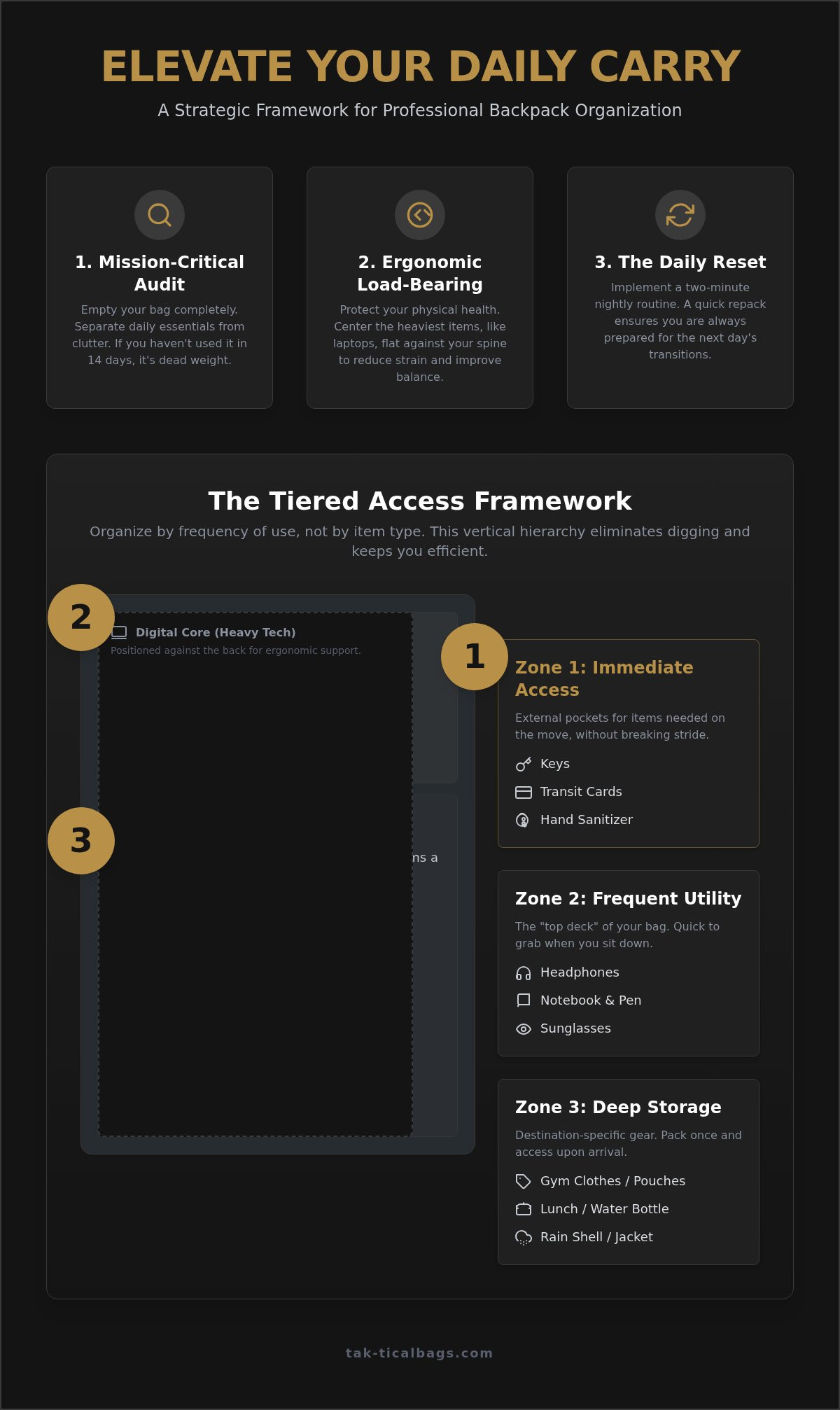
Mastering how to organize a backpack requires a shift from horizontal thinking to vertical hierarchy. Most users treat their bag as a single void. This leads to the "black hole" effect where essentials vanish. A strategic framework divides your bag into functional zones based on frequency of use and security. By establishing this hierarchy, you minimize the time spent with your main compartment open in public spaces. This protects your privacy and your gear. Whether you're navigating a crowded subway or packing a backpack for a day hike, the logic of tiered access remains your primary tool for efficiency.
Zone 1: Immediate Access (The Outer Pockets)
External compartments serve your movement. Store keys, transit cards, and hand sanitizers here. These are items you need while walking or standing in line. Keep these pockets lean. Overstuffing them ruins the bag's minimalist silhouette and puts unnecessary tension on the zippers. Avoid placing high-value electronics or wallets in outer mesh pockets. These areas lack the structural protection of the inner core and are vulnerable to opportunistic theft. A sleek laptop bag with dedicated, hidden external pockets is ideal for maintaining security without sacrificing speed.
Zone 2: Frequent Utility (The Top Deck)
The top deck is for items you reach for 3-5 times a day. Position your sunglasses, headphones, or a small notebook here. These should be retrievable with a partial unzip. You shouldn't have to dig past your lunch to find your earbuds. This zone acts as the "active workspace" of your bag. By keeping these high-frequency tools at the top, you maintain a sense of organized calm during fast-paced transitions. It's about being ready for a call or a sudden change in weather without disrupting the rest of your gear.
Zone 3: The Deep Storage (The Bottom)
Reserve the base of the bag for lightweight, bulky items. A rain shell, gym clothes, or a spare sweater belong here. These items provide a structural "cushion" for the gear sitting in the middle levels. Never place heavy tech or glass containers at the very bottom. Doing so risks impact damage every time you set the bag down on a hard surface. Adhering to these principles of Backpack Safety ensures you don't just protect your belongings, but also maintain a balanced load. This foundation supports the weight of the more critical items stored in the zones above, keeping the entire system stable and comfortable.
Strategic Tech Management: Protecting the Digital Core
Your laptop isn't just another item in your bag. It's the structural anchor of your entire mobile office. When learning how to organize a backpack, you must treat your digital tools as the rigid core around which everything else rotates. Professional environments demand a higher level of protection than simple school supplies require. By prioritizing tech placement, you create a stable internal frame that prevents the bag from collapsing or sagging. This purposeful arrangement ensures your most valuable assets remain secure during high-speed urban transitions.
Implement a strict "No Loose Cables" rule. Unsecured cords are more than just a nuisance. They act as magnets for dust and lint, which eventually migrate into your device ports. They also create friction against other items, leading to frayed shielding or damaged connectors. Utilize dedicated internal pockets for power bricks and external drives to keep heavy peripherals from shifting. For those seeking maximum security, exploring sophisticated laptop bags with built-in technical structure is the most efficient way to simplify this process.
Dedicated Sleeves: Why Placement Matters
Position your laptop directly against the back panel. This keeps the heaviest, flattest object closest to your center of gravity, which improves balance and reduces perceived weight. High-quality sleeves are often "suspended," meaning the pocket ends an inch above the bottom of the bag. This design prevents your device from hitting the floor when you set the bag down. If you carry multiple screens, use secondary padded dividers for tablets and e-readers. This prevents screen-to-screen friction and ensures that a single impact doesn't damage two devices at once.
Cable Management: Eliminating the Tech Tangle
Modular organization is the key to a frustration-free commute. Use cord wraps or a dedicated tech pouch for all charging peripherals. This keeps your main compartment clear and makes it easy to swap gear between different bags. Store small adapters and memory cards in zippered mesh pockets where they are visible but secure. Adopting a "One Cable, One Purpose" rule helps maintain a minimalist carry. If a single high-quality USB-C cable can charge your laptop, phone, and headphones, leave the redundant cords at home. This reduces volume and reinforces the efficiency of your system. Mastering how to organize a backpack is ultimately about removing the friction from your digital life.
Ergonomic Load Distribution: Precision Packing for Comfort
Precision packing turns a heavy burden into an integrated extension of your body. Most people ignore the physics of their carry. This leads to chronic fatigue and unnecessary back strain. Learning how to organize a backpack is a matter of biomechanics. It's about aligning your gear with your natural center of gravity. When weight is distributed incorrectly, your body compensates by leaning forward or arching the spine. This breaks your posture and slows your momentum. Proper distribution ensures you remain agile and focused throughout your commute.
Pack your heaviest items close to your spine and centered. This includes laptops, hardware, or large documents. This placement prevents the bag from pulling away from your shoulders. Avoid bottom-heavy packing. Placing heavy gear at the very base of the compartment causes the bag to sag. This puts excessive pressure on your lumbar region. Instead, use the base for lighter, high-volume items like a rain shell. This creates a platform for the dense equipment above. Utilize built-in compression straps to keep the load tight. Shifting gear is a primary cause of imbalance during movement.
The Center of Gravity: Keeping Weight Close
The heaviest gear should sit between your shoulder blades, not your lower back. This alignment keeps the weight over your hips, which are designed to carry loads. Use internal dividers or tech sleeves to lock these heavy items in place. If your gear shifts every time you turn a corner, your muscles are constantly working to stabilize the bag. Test the balance by standing the bag upright on a flat surface. It shouldn't tip over easily. A well-balanced bag reflects a well-organized mind.
Symmetry and Balance: Avoiding Strain
Ensure your side pockets are balanced to prevent horizontal pulling. If you carry a heavy water bottle on one side, counter it with an umbrella or tech kit on the other. Symmetry is essential for long-term physical comfort. Adjust your shoulder straps so the bag sits high on your back. The bottom of the backpack should never rest more than four inches below your waistline. For those looking to upgrade their carry, the best backpacks for work often include specialized suspension systems to aid this distribution.
Ready to experience the difference of a bag built for technical excellence? Explore our collection of high-performance backpacks designed for the modern professional.
The Daily Reset: Maintaining Your Organizational Edge
Organization is a discipline. It requires consistency to remain effective. Even the most refined system will degrade into chaos without a commitment to maintenance. Learning how to organize a backpack is the first step; keeping it organized is what defines a true professional. A daily reset ensures your bag remains a tool for efficiency rather than a source of stress. By dedicating a few moments each evening to your gear, you eliminate the morning friction that slows your momentum.
Implement the Two-Minute Reset every evening. This brief window allows you to purge the day's accumulation. Remove old receipts, food wrappers, and miscellaneous debris. Restock your daily essentials. Ensure your pens are functional and your backup batteries are replenished. This habit guarantees that you start every morning in a state of purposeful readiness. You aren't just packing; you're preparing for your next mission. Rotate your gear with the seasons. An umbrella or heavy gloves shouldn't occupy valuable space when they aren't required. Keeping your carry lean and relevant maintains the bag’s minimalist silhouette.
For those who value high-performance utility, investing in a dedicated everyday carry backpack provides the built-in structure necessary to make this maintenance effortless. A vessel built for order simplifies your life by providing a permanent home for every essential tool.
The End-of-Day Clear-Out
Focus your attention on Zone 1. These outer pockets are the primary collection points for clutter. Empty them completely. Check your tech stack for items that require charging. Remove power bricks or headphones and connect them to their chargers immediately. This prevents the frustration of discovering a dead battery during a critical commute. Take a moment to wipe down the exterior of your bag. Maintaining the aesthetic integrity of your gear is essential for a professional appearance. It projects an image of composed expertise to everyone you meet.
Upgrading Your Vessel
Recognize when your current bag’s lack of structure is the root of your frustration. If your gear constantly shifts and tangles, your hardware may be failing you. High-denier fabrics and reinforced stitching provide the rigidity needed to support a tiered access system. Choose a bag that fits your specific tech stack and daily mission. A bag with intuitive pocketing does half the work for you. Mastering how to organize a backpack is significantly easier when the bag itself is designed for technical excellence. True efficiency begins with a foundation of quality craftsmanship.
Master Your Daily Carry
Strategic organization is an investment in your daily momentum. It's about more than neatness; it's about purposeful readiness. By adopting the Tiered Access Framework and prioritizing ergonomic distribution, you transform your bag into a high-performance tool. Mastering how to organize a backpack ensures your digital core remains protected while your essentials stay within reach. Consistency is the final piece of the puzzle. A brief nightly reset preserves your system and prepares you for the fast-paced transitions of modern life.
True efficiency requires a foundation of quality craftsmanship. Our designs offer tactical-grade durability and a sleek urban aesthetic to support your most demanding journeys. Every bag is engineered for digital protection, providing the structural security your tech stack deserves. Elevate your carry with a Tak-tical backpack designed for precision organization.
Step out with the composed confidence of a professional who is always prepared. Your daily journey deserves a partner that values functional excellence as much as you do.
Frequently Asked Questions
How do you organize a backpack with no pockets?
Utilize modular pouches to create a custom internal structure. When your bag lacks built-in dividers, these pouches act as independent compartments for tech, documents, and tools. Grouping items into specific kits prevents gear from shifting and settling at the bottom. This approach allows you to swap your entire setup between different bags in seconds. It's the most efficient way to maintain a minimalist aesthetic without sacrificing technical utility.
Where is the best place to put a laptop in a backpack?
The optimal position is in a dedicated sleeve directly against the back panel. This placement keeps the heaviest item closest to your center of gravity. It improves balance and reduces the perceived weight on your shoulders. Ensure the sleeve is suspended to prevent the device from hitting the ground when you set the bag down. Following this rule is critical for protecting your digital core from impact and friction during urban commutes.
How can I prevent my backpack from feeling too heavy?
Focus on vertical weight distribution and load stability. Pack your densest items, such as hardware and books, centered against your spine. Use compression straps to pull the weight closer to your body. This prevents the bag from pulling backward and straining your neck. Avoid bottom-heavy packing by placing lighter items at the base. A balanced load feels lighter because it works with your body's natural biomechanics rather than against them.
What items should always be in an everyday carry backpack?
Your digital essentials, a minimalist tech kit, and a high-quality writing tool are non-negotiable. Include a lightweight rain shell and a reusable water bottle for environmental versatility. Every object must serve a clear purpose in your daily mission. If an item hasn't been used in 14 days, it's likely dead weight. Learning how to organize a backpack effectively means constantly auditing your gear to ensure only the most vital tools remain.
How often should I clean and reorganize my backpack?
Implement a daily two-minute reset to remove clutter and a full reorganization every 30 days. The nightly reset clears out receipts and debris that accumulate during transitions. The monthly audit allows you to rotate seasonal gear and inspect the integrity of your bag's hardware. Consistent maintenance ensures you understand how to organize a backpack for maximum efficiency. It keeps your carry lean and your professional aesthetic sharp throughout the year.
Should I use packing cubes for a daily commute backpack?
Structured tech pouches are more effective than traditional packing cubes for a daily commute. While cubes are designed for clothing volume, pouches manage the density of chargers, cables, and peripherals. These modular tools provide the internal rigidity necessary to keep your main compartment organized. They prevent items from tangling and make your gear retrievable without unzipping the entire bag. This system supports a fast-paced, mobile lifestyle by offering purposeful readiness.
How do I stop small items from falling to the bottom of my bag?
Assign a permanent home to every small object within the top deck or internal mesh pockets. If your bag lacks specialized compartments, use a dedicated tech organizer for all loose items. Never drop keys or adapters directly into the main void. This discipline prevents pocket creep and ensures your most-used tools are always accessible. Maintaining this level of order reduces the time spent digging for gear and reinforces your daily efficiency.