
Why does a high-end bag so often transform into a disorganized void the moment you need a charger? Most professionals accept the "black hole" effect as an inevitable tax on a mobile lifestyle. You've likely felt the irritation of digging for a pen during a high-stakes pitch or untangling a mess of power cords at the airport. Mastering how to organize a laptop backpack is the solution. It's a fundamental shift from simply carrying gear to strategically managing your mobile office.
Efficiency requires more than just extra pockets; it demands a clear system. We've developed a 2026 strategy for purposeful carry that prioritizes ergonomics and instant access. This approach eliminates physical strain by balancing weight. It protects your tech from unnecessary wear. It's about readiness. It's the confidence that comes with a perfectly calibrated kit.
You're about to learn a sophisticated, zone-based organization method. We will walk through the logic of weight distribution and the art of cable management. Expect a repeatable system that makes transitions between the boardroom and the terminal seamless. It's time to turn your backpack into a tool of quiet empowerment and elevated efficiency.
Key Takeaways
- Perform a ruthless EDC audit to separate essentials from clutter. It's the first step toward a minimalist, high-performance carry.
- Learn how to organize a laptop backpack using a strategic three-zone system. This mapping ensures your most-needed items are always within reach.
- Switch to a modular pouch system for tech and cables. It's more efficient than built-in pockets and prevents the dreaded "black hole" effect.
- Pack for ergonomics by keeping heavy gear close to your spine. Proper weight distribution reduces physical strain and keeps you moving faster.
- Integrate tactical-style utility into your professional life. Use customizable layouts to adapt your bag for work, travel, or the trail.
The EDC Audit: Foundations of a Purposeful Carry
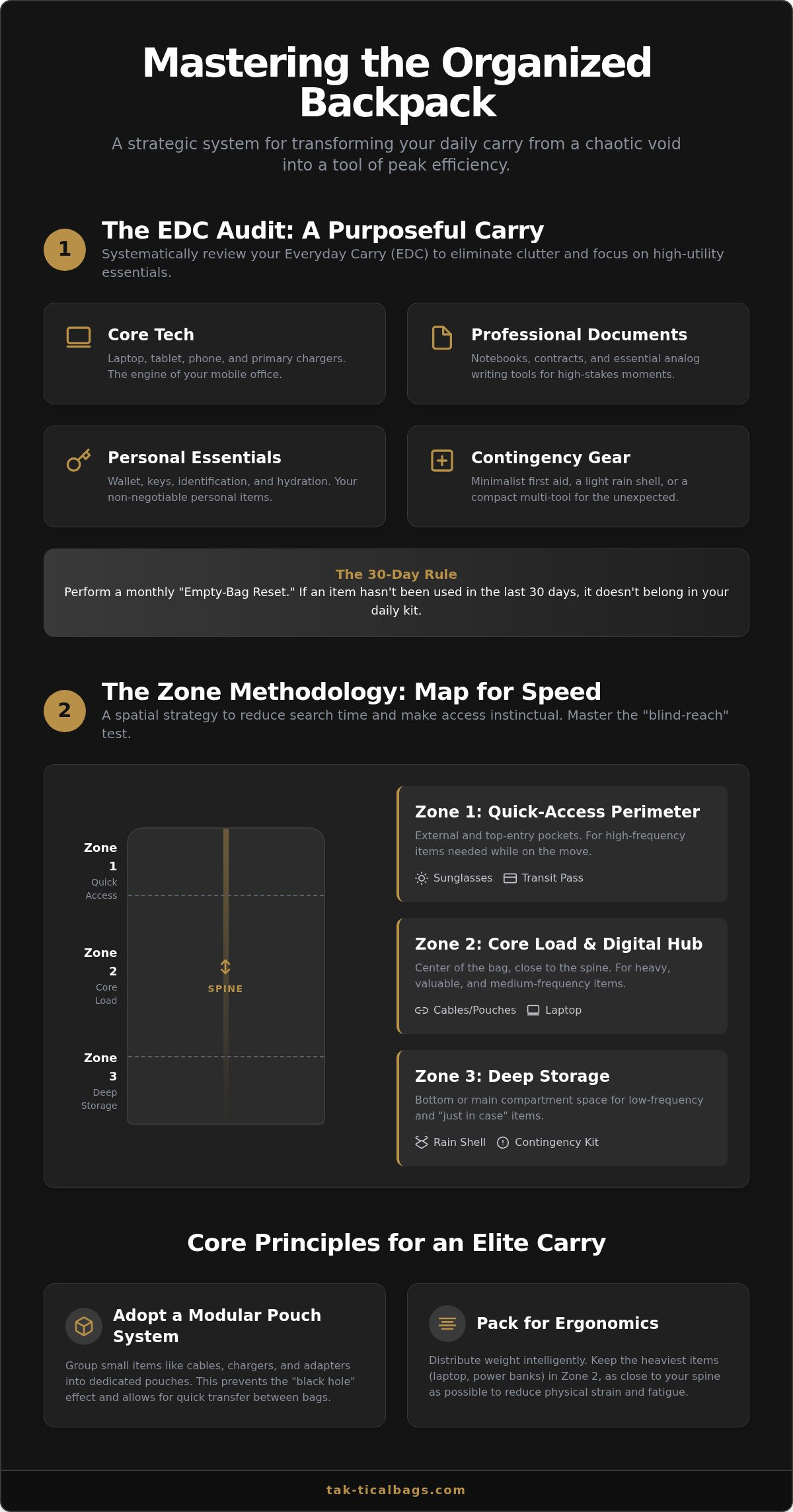
Organization is a mindset. It begins long before you touch a zipper or slide a laptop into its sleeve. Before you attempt to master how to organize a laptop backpack, you must confront the clutter that accumulates in the corners of your daily life. The EDC Audit is the mandatory precursor to efficiency. It's a systematic review of every item you carry, designed to eliminate the "just in case" mentality that leads to physical and mental fatigue.
The urban innovator understands that less is more. While some argue that a larger bag is the solution to disorganization, the opposite is true. Mass attracts mass. A purposeful carry focuses on high-utility essentials that serve multiple roles. Everyday Carry is a curated set of tools for readiness. To begin your audit, group your gear into four distinct categories:
- Core Tech: Your laptop, tablet, and primary chargers.
- Professional Documents: Notebooks, contracts, and analog writing tools.
- Personal Essentials: Wallet, keys, and hydration.
- Contingency Gear: Minimalist first aid, a light rain shell, or a compact multi-tool.
The Empty-Bag Reset
Clutter is silent. It builds up in the form of old receipts, dead batteries, and forgotten business cards. These are "ghost items" that add weight without providing daily value. Commit to a monthly reset where you empty your backpack completely. This practice offers a psychological benefit; it provides a clean, minimalist start that reinforces your commitment to an organized life. It's the most effective foundational step in how to organize a laptop backpack for maximum efficiency. If an item hasn't been used in the last thirty days, it doesn't belong in your daily kit.
Categorizing by Frequency of Use
Efficiency is defined by the speed of access. You shouldn't dig for your transit pass or office badge. Tier 1 items are your high-frequency tools; these are the things you touch ten or more times a day. Tier 2 items, like a laptop charger or a notebook, are used once or twice. Tier 3 items are for emergencies only. This hierarchy dictates the "Zone" placement we'll explore in the next section. By separating your gear by frequency, you reduce the cognitive load of searching. You stop thinking about where things are and start focusing on the work at hand.
The Zone Methodology: Mapping Your Backpack for Speed
Efficiency is not a result of having more pockets. It is the result of knowing exactly where every tool resides. The Zone Methodology is a spatial strategy designed to reduce cognitive load during high-pressure transitions. This system categorizes your bag into three distinct areas: Quick Access (Zone 1), the Core Load (Zone 2), and Deep Storage (Zone 3). When you're moving between a crowded train and a boardroom, your brain shouldn't waste energy searching for a badge or a cable. This system creates a mental map of your carry. It transforms the question of how to organize a laptop backpack from a chore into a tactical advantage.
The ultimate benchmark for this system is the "blind-reach" test. You should be able to retrieve your keys, phone, or primary charger in total darkness. If you have to look inside your bag to find a high-frequency item, your organization has failed. For the tech-heavy professional in 2026, speed is the primary metric of success. Mapping your bag into these zones ensures that your most critical tools are always a muscle-memory movement away.
Zone 1: The Quick-Access Perimeter
This zone consists of the external and top-entry compartments. It is reserved for items you need while the bag is resting on the floor or between your feet on transit. Think of this as your immediate utility layer. Top pockets should house your sunglasses, transit pass, and office credentials. Side pockets are often underutilized; they're perfect for more than just hydration. Use them for a compact umbrella or a small pouch containing your most-used adapters. Tactical-style bags excel here. They often feature external attachment points like PALS webbing, allowing you to customize your perimeter for specific missions without opening the main compartment.
Zone 2: The Core Load and Digital Hub
The center of your bag is its engine room. This is where you centralize your laptop and main power sources. Stability is key here. Keeping the heaviest items close to your spine prevents the bag from pulling outward, which saves your shoulders from fatigue. Modern laptop bags are designed to bridge the gap between office and transit by offering dedicated, suspended sleeves for tablets and e-readers. This protection is vital for the 2026 commuter who carries multiple glass-screen devices. By grouping your digital tools in this central hub, you create a protected environment that is easy to manage. If you're looking for a clean slate to implement this system, consider exploring our range of tactical style everyday backpacks designed for urban utility.
Tech Protection and the Modular Pouch System
Static organization is a relic of the past. Traditional bags rely on built-in pockets that never quite fit your specific gear. For the modern professional, the shift toward modularity is essential. Pouches outperform built-in pockets because they adapt to your changing needs. This system is the definitive answer to how to organize a laptop backpack without falling victim to the "cable nest." By using dedicated cord organizers, you prevent tangles and protect sensitive connectors from damage. Whether you choose hard-shell cases for external drives or soft-shell pouches for chargers, modularity ensures your kit remains a best edc backpack candidate through every transition.
The Tech Pouch: Your Digital Survival Kit
Think of the tech pouch as your portable command center. Group your chargers, dongles, and power banks into this single, removable unit. This creates a "Grab-and-Go" advantage that's indispensable for cafe work or rapid boardroom transitions. Instead of hunting for individual items, you retrieve one pouch and have everything you need. If your kit is extensive, consider color-coding. Use a black pouch for power and a grey one for connectivity. This allows for instant identification under pressure. It's a simple, high-impact habit that maintains the minimalist flow of your day.
Securing the Laptop
True protection requires more than just a padded sleeve. You must respect the "False Bottom" rule. Your laptop should never touch the floor of the bag. A suspended compartment creates a buffer zone that absorbs impact when you set your bag down. Proper orientation is equally critical. Always place your laptop with the charging port facing upward. This allows you to connect a power bank for in-bag charging while you're on the move. To achieve the highest level of security, combine a slim sleeve with a dedicated work backpack. This double-layer approach provides a redundant safety net for your most expensive tool. It's a sophisticated strategy for those who value both utility and peace of mind.
Ergonomics and Weight Distribution: Carry Smarter
A bag's weight is a variable, but its impact on your body is a choice. If you haven't mastered the physics of weight distribution, even the most expensive gear will feel like a burden. Poor packing leads to more than just temporary discomfort. It causes shoulder fatigue and long-term postural issues that can derail your focus. The "Center of Gravity" principle is the core of ergonomic carry. It dictates that the heaviest items must remain closest to your spine. This prevents the backpack from pulling your center of mass backward, which forces your neck and shoulders to overcompensate. Learning how to organize a laptop backpack correctly means treating your bag like a technical rig, not a simple sack.
In urban environments, a "high and tight" fit is superior. Adjust your shoulder straps so the bag sits firmly against your upper back. This minimizes sway and keeps the load integrated with your natural movement. Vertical weight distribution is just as critical as horizontal placement. By stacking your gear strategically, you ensure that the weight is transferred through your hips rather than hanging solely from your trapezius muscles.
The 'Heavy Near the Spine' Rule
The back-most compartment is your anchor point. Place your laptop and any large documents or books here. This keeps the heaviest mass directly against your back. Use the mid-bag space for your modular tech pouches and medium-weight gear. This central layer acts as a stabilizer. Finally, reserve the bottom of the bag for light, bulky items like a rain shell or a gym jacket. Many commuters make the mistake of putting heavy items at the bottom. This causes the bag to sag and pull away from the shoulders, creating unnecessary strain. Invest in tactical style everyday backpacks that offer the structural integrity needed to maintain this vertical stack throughout the day.
Symmetry and Balance
Symmetry is the final component of a sophisticated carry. Avoiding the "one-sided lean" is vital for maintaining a healthy walking gait. If you carry a heavy water bottle in one side pocket, balance it with a tripod or an umbrella in the other. Off-balance loads cause your spine to curve laterally, leading to hip and lower back pain over time. This attention to detail is what separates a professional from an amateur. You can refine your system further by looking at how the best hiking backpacks manage load lifters and sternum straps. Integrating these technical features into your city-to-trail transitions ensures you remain ready for any environment without compromising your physical well-being.
Integrating Tactical Design into Professional Life
Tactical design is the bridge between raw utility and professional sophistication. While many associate tactical gear with the wilderness, the urban innovator recognizes its potential for daily efficiency. Using tactical style everyday backpacks provides a level of customization that traditional office bags cannot match. This is the ultimate framework for how to organize a laptop backpack. Internal PALS or MOLLE webbing allows you to anchor pouches exactly where your workflow demands. It's about creating a bespoke interior that evolves with your gear. You aren't limited by a designer's choice of pocket placement; you define the layout yourself.
This design philosophy supports a seamless transition. You can move from a high-stakes meeting to a weekend trail without a complete repack. The aesthetic is minimalist. It doesn't scream for attention, yet it offers rugged durability that survives the friction of a daily commute. You get the strength of technical materials without the cluttered military look. It's a refined approach to readiness that prioritizes function without sacrificing a clean, professional profile.
Refined Utility: The Tak-tical Persona
The sleek, urban innovator views their gear as an extension of their capabilities. Heavy-duty materials like high-denier nylon aren't just for show; they provide a reliable partner in a fast-paced lifestyle. These bags are built to withstand the rigors of transit, from crowded subways to overhead bins. A tactical-style bag doesn't just hold your laptop. It protects your livelihood. It's a composed expert that understands the demands of a mobile office. By choosing a bag with a minimalist aesthetic and rugged bones, you signal a commitment to quality and functional excellence.
Next Steps: Mastering Your Carry
A system is only as good as its maintenance. To keep your bag "black-hole-free," develop a 60-second end-of-day reset routine. Open the main compartment, remove any trash, and ensure your Tier 1 items are back in their designated zones. Every Friday, evaluate your bag's performance. Ask yourself if any item felt difficult to reach or if a specific pouch needs repositioning. Constant refinement leads to effortless efficiency. If you're ready to upgrade your mobile office, explore the Tak-tical collection for a bag that works as hard as you do. Embrace a carry system that empowers your daily journey.
Elevating Your Daily Carry Strategy
True organization is a competitive advantage. By moving beyond the "black hole" effect, you reclaim time and mental clarity. You've learned to audit your gear, map your bag using the Zone Methodology, and prioritize ergonomic health through proper weight distribution. Mastering how to organize a laptop backpack isn't just about finding a place for your gear; it's about maintaining a state of constant readiness. A modular approach using pouches ensures your tech remains protected and accessible during high-pressure transitions. It's the difference between simple transit and purposeful carry.
A sophisticated system requires a high-performance foundation. Tak-tical provides the ideal clean slate with durable, tactical-style designs that meet the standards of modern professionals. Our bags combine minimalist aesthetics with functional excellence to ensure your kit remains streamlined. With worldwide shipping available for global innovators, we support your journey wherever it leads. It's time to invest in a carry solution that matches your ambition and protects your most valuable tools. Your daily kit should be a source of confidence, not frustration.
Upgrade your everyday carry with Tak-tical’s purposeful backpacks. Start your transition toward a more efficient, organized lifestyle today. You're ready for whatever the modern landscape demands. Your journey deserves the precision of a professional kit.
Frequently Asked Questions
What is the best way to prevent cables from tangling in a backpack?
Use modular tech pouches or dedicated cord organizers to isolate individual cables. Coiling your wires using the "over-under" method and securing them with hook-and-loop ties prevents internal wire damage and messy tangling. Dedicating one specific pouch for power and another for connectivity ensures you aren't digging through a nest of wires. This approach keeps your kit ready for instant deployment during high-stakes meetings or rapid travel transitions.
How do I distribute weight in a laptop backpack to avoid back pain?
Keep the heaviest items, such as your laptop and power banks, closest to your spine. This maintains your natural center of gravity and prevents the bag from pulling your shoulders backward. Distribute medium-weight items in the center and light gear at the bottom. Adjusting your straps for a high, tight fit ensures the load remains integrated with your body's movements, significantly reducing the risk of chronic back pain and shoulder fatigue.
Should I use a laptop sleeve if my backpack already has a padded compartment?
Yes, adding a slim sleeve provides a secondary layer of protection against debris and minor impacts. It also allows you to remove the laptop safely when the bag is placed on a dirty or uneven surface. This double-layer strategy is a sophisticated way to manage how to organize a laptop backpack while ensuring your most expensive tool remains pristine during daily commutes or long-distance travel.
How do I organize a backpack that doesn't have many pockets?
Utilize a modular pouch system to create your own internal structure. Group related items into color-coded pouches to replace the need for built-in dividers. If your bag features PALS or MOLLE webbing, you can anchor these pouches securely to prevent shifting. This method transforms a simple sack into a highly organized tactical-style rig tailored to your specific professional workflow, providing the same efficiency as a multi-compartment bag.
Where should I put my heavy power brick for the best balance?
Position your heavy power brick in the middle of the bag, vertically, and close to the laptop compartment. Placing it too low causes the bag to sag, while placing it too high makes the load feel unstable. Keeping it centered and close to your back ensures the weight is transferred efficiently through your core. This balance is critical for maintaining a comfortable walking gait and professional composure in fast-paced urban environments.
How often should I clean and reorganize my work backpack?
Perform a full "Empty-Bag Reset" once a month to remove accumulated clutter like old receipts and forgotten items. On a daily basis, spend sixty seconds at the end of your shift returning your high-frequency tools to their designated zones. Regular maintenance ensures that your strategy for how to organize a laptop backpack remains effective. It prevents the slow creep of disorganization that eventually leads to the dreaded "black hole" effect.
Can I use a tactical hiking backpack for a professional office job?
Absolutely, provided the design features a minimalist aesthetic and a clean profile. Modern tactical-style everyday backpacks offer superior durability and organizational features compared to traditional briefcases. They excel at protecting tech while providing the versatility needed for city-to-trail transitions. Choosing a bag in a neutral color like black or slate grey ensures it looks composed and expert in a boardroom setting while offering rugged, reliable utility.
What are the essential items every professional should have in their EDC?
A curated kit should include your laptop, a multi-port charger, a high-capacity power bank, and a dedicated tech pouch. Analog tools like a high-quality notebook and pen remain vital for rapid ideation and professional readiness. Finally, include contingency gear such as a compact rain shell and a basic first aid kit. This selection prioritizes utility and ensures you're prepared for the diverse demands of a mobile professional lifestyle without adding unnecessary bulk.